
Building a Database of Wisdom: Why Readwise is Invaluable
"Knowing is not enough; we must apply. Willing is not enough; we must do."Johann Wolfgang von Goethe
We are surrounded by information. It comes at us from every angle. It is a boon of our modern era.
It is also often a fallacy, a lie. And because it surrounds us, we think we are actually learning. We aren't. We float in a vast sea of information, yet we are still dying of thirst. Surrounded by water, we have no way to be nourished by it.
If we want to really learn, we need more than just knowledge. We need to be able to apply, to take action because of it.
We need a system to manage all that knowledge.
Enter Readwise.
I rely on and use Readwise every day. It is an essential tool for my knowledge management.
But a year ago? I thought it was a silly and superfluous service.
What changed?
Before I dive into how I use Readwise and why it is such an essential part of my knowledge management workflow, we need to understand what it is. That was my problem: I didn't fully understand what the service entailed. That was my reason for discarding it.
This article aims to help make its function clear. My personal use of the service will follow.
I'd heard about Readwise from some podcasters and other people whose work I follow. Still, it didn't call to me. It is a bit pricey, currently at over $100/year, and I had serious doubts that I would get that much value from it.
Boy howdy, was I ever wrong.
I finally decided to give it a try, though, after becoming aware of the Reader app that was part of Readwise.
Let's see what the service is, and what both major aspects of Readwise do.
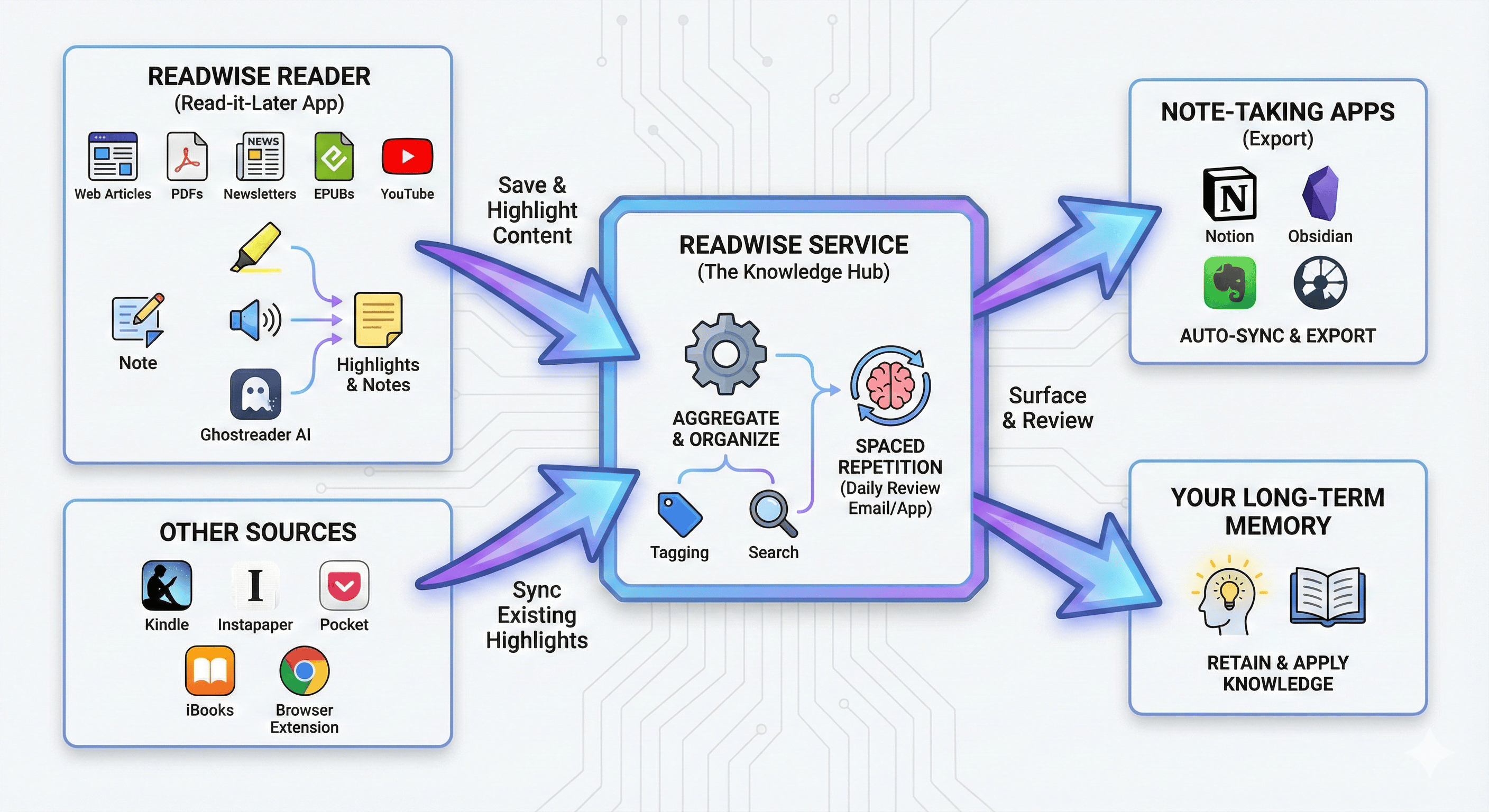
There are two key parts of Readwise: Readwise itself and Readwise Reader. While they both work toward the same goal, they go about it a bit differently.
First, Readwise. The purpose of Readwise is to aggregate any highlights you make of anything you are reading and then get those highlights back to you in a variety of different ways.
Readwise can link to your accounts on many different services. I read most of my books either via Kindle or Kobo. I have linked both of those to Readwise, so it aggregates any highlights I make in any book in either of those apps or devices. It also links to other read-later services, like Instapaper (RIP Pocket!), bringing those highlights in to your library.
If that were all, the utility wouldn’t be worth it. However, by installing the Readwise browser extension, I can now highlight anything I see on any webpage and then send that highlight to Readwise. I’ve just extended the information I can save to almost anything I can read on a computer or tablet.
But what about physical books? Readwise has that covered as well. Simply open the Readwise app, and it will take a picture of the book text, OCR it, and then I can specify the highlight I want to save.
The more I use it, the more well-thought-out it is.
But Readwise is just part of the picture.
Reader is the other, and perhaps more essential half of the equation.
Reader is, itself, a read-later application. If I find longer articles on the web that I want to read, I use the extension and send them to Reader. It strips out the ads and any other distracting elements, leaving the text and key images of the article.
It makes reading a much more pleasant experience, without the multitude of annoyances that come from the internet.
That’s not all it does, though.
Any newsletters I have signed up for, I can either forward to a Readwise-specific email address or use that address to subscribe to those newsletters, and they just show up in Reader. I can subscribe to RSS feeds in Reader and will get any new content from those sources in my Inbox. I can even save YouTube videos to Reader. Reader transcribes the videos, making it easy to take notes and save anything from the video.
Most importantly, just about any document (PDF, EPUB, DOC, etc.) I can upload to Reader and read, highlight, and annotate in the app.
This makes it fairly frictionless to add anything important to my Readwise archive.
Finally, one repository for all the knowledge from what I read, watch, and even listen to.
But all of that information, all of that potential knowledge, is useless if you don’t do anything meaningful with it. Once I understood this, Readwise really opened up to me.
Reader is for just that: reading. I open it, go through my feed to see what new articles I want to save and read later. Then I go to the inbox and decide what to read, and dive in.
The Readwise app itself now becomes the key to this second part of the system. Each day, there are anywhere from 5 to 15 highlights that have been randomly chosen for review. There, you can favorite, add tags, notes, or discard highlights. Known as spaced repetition, this style of learning is one of the most effective for remembering/learning information.
And this is your own information—the things you have saved.
Also, while not essential, there is the option to use AI to “chat” with your highlights. This can be useful to find links, to review a particular subject or topic, and to help bring different highlights that address similar things together.
Finally, none of this data is locked. Yes, you would lose access to the Readwise part of it if you decided to no long use the service. But at any time, you can export all of your data in any number of formats.
This is hugely important. Your data is just that: yours. You can use it however you want at any time. They never lock that data behind any doors.
So, that’s Readwise. At first, it seems simple, but it doesn’t take very long to understand the complexity of the tool. But it is a complexity that you only engage with at your own discretion. Much of it just happens in the background once it is set up.
Next week, I’ll walk through my workflow to really see why this is such an important tool in my daily life.